Fast shutter speed

A fast shutter speed helps you to catch a photo of a moving objects this is a great way for to see how car are like when they lave a trail of light or when you can see how birds fly in the sky.

I’m going to explain about the basic of a fast shutter so you will know how to set it up for your own camera or if you are going to go in to photography.

A fast shutter speed will be down to the normal set speeds. and here is a basic set up for you.

1s 1/2s 1/4s  1/8s  1/15s  1/30s  1/60s  1/125s  1/250s  1/500s  1/1000s 1/2000s

as you can see this is the line of seep that the shutter camera you can set up for you in your camera.

Here we have a chart so you can what the best speed is for in any situation for you to know.

Sleeklens_14-2

hopeful this chart can help you understand how to do a fast shutter speed were you are.

Also here are some more facts about more in detail.

Fast shutter speeds such as, 1/250s, will freeze faster moving subjects, depending upon their speed of movement.

Slower shutter speeds such as, 1/30s, and slower, will create motion blur with moving subjects, depending upon their speed of movement.

When hand holding a camera, depending upon your choice of lens, you should ideally select a shutter speed of at least, 1/60s, to prevent camera shake, without using a tripod.

also i do have some photos that you can see of fast shutter speed. you have already seen them but its a way for you to understand shutter speed.


all tho you have seen these photo i want to show how the fast shutter speed is like of some of the photos that i have done. So you can understand what it looks like.


And here are some photos that i have found on the internet so you can get more of a idea how to do a fast shutter speed photos.

Painting Whit light

Whit painting whit light its a hard step for someone how is new to photograph but if you expressions whit the camera then you are able to do this.

So what i’m going to do is talk to you about how i mange to take photos of me. Doing movements of lights which i’m not going to lie it was a bit hard, but fun at the same time as well i do have some fire poi photo to show you as well.

The camera that i have used is a coolpix l840 Nikon so how did i mange i put my stetting to party/indoor so that the mini torch in my room whit the light off.

To get the shape and the time for it to show i have made a pattern what i did was i change my image mode down to VGA 640×480. So that you can see the shape of the light.

as i do not have a stronger camera that has a viewfinder i had to make do what i had available to me. Also the timer that i had set was two seconds so i can get the right photo.

I will say the number of times that i had not been ready was a bit annoying to say the least but i did have a lot of fun with it, but a lot of deleting at the end.

so here is some photos of me doing painting whit lights .

DSCN2319

DSCN2317

DSCN2320

I’m very happy how these photo came my favorite one has to be the second photo because it has more character to it. and i find it more eye catching from the others may be because for the shape and the detail it has a well.


Fire poi

now when i was thinking about painting with lights i was saying wait have have some. So you are going to see some fire poi photos from Pembroke. The group is called  Pembrokeshire Fire Spinners they do amazing shows and if you like to see what they do they will be on Facebook and  Instagram.

so i’m going to show you theses photos i have got of fire poi and i hope you will like them as much as i do.

Here we have three photos of some people doing fire pot and as you can see the patterns the flames give of when its being spend.


my favorite has to the fourth one as it has more of  light pattern all tho you can say that to the other three as well.


Here are some personal photo that i like of the fire poi so that you can see the different effects and moves they have done.


Dark room photo

Health and Safety for the dark

I had a fun day in my photographer lesson. we went in to the dark room but i’m going to take about the health and safety that you will need talk about.

So when going in the dark room you must not bring food or drinks because of the sockets that are in the room and if you spill it you are going damage the equipment.

As well do not bring you bags in the dark room as when the lights go to red light the room dose go’s dark and if your bag is laying on the fool you are going to trip on to the fool.

another thing is that keep your phones out of the dark room or off as the light of the phone will photo exposed to photo gram will  get exposed and get damage.

one more thing as we;; please keep the photo gram cover in the black bag and keep the box closed as well.

one more thing to dos is as well wash your hands after are done because if the chemicals cloud get in you eyes.

Photogram

Photogram is the starting out point in making your old school photos i’m going to saying that a lot so be prepared. so this paper you must be care as this paper dose cost a lot of money. When you are in the dark room the room will be in what is called white light. Which the photogram dose not like it because you will be unable to print the objects on the photogram.

After when you have done everything right whit the enlarger and the developer, stop bath and the fixer which i will get in to more detail about them. You will produce beautiful photos.

photogrambits

And here is a photo of the photogram so you know what it looks like.


Enlarger

the enlarger is the starting point on making your old school photogram what it does while your in the dark room is that you will need to set the timer for 5 scones. On the timer when setting it up as well whit the enlarger. In the back side there handle were you can make the light go in to a focus so it will have a sharp light so the image for the objects will print on the the photograph.  so in the way its like a zoom so to speak.

img_6076

This is a photo of a enlarger but there are a lot of different tips but this photo is to show you what a enlarger.

enlarger_safelight

and this is a photo of what a enlarger and what it dose. but this is a old example so please do keep in mind if you have a new up to date enlarger. But do not fare there should be instructions.

How to make sore the white light dose not print on to the photograph well you have objects?

The answer to this question is that is like the dark room you are in this that you can have this red lens. Which will help places the object safely on to the photograph whit out the trouble of the white light printing on to the photograph.

budgetdarkroom1_JA

Here is the photo of a red lens so that you know what it looks like if you are new to photograph photographer.

Developer

The developer is one of the keystone in get in the photographic  photo to come out what happens is that the chemicals helps the bring the image of the photo out. Because how the exposure to white light  will be printed on the the photographic.

What the chemicals do? as i said they help bring out the image but there is a set time you have to keep it in the developer of. please keep in mind that the photographic must stay in for a mint if you bring it out to yearly and put in the fixer. Image will set in a white blob and there will be no way of restoring it.


maxresdefault

Here is a photo what it will look like if you put your photographic in the developer.

Stop Bath

The stop bath helps the developed photogram to stop the chemicals which are in the photogram. So what will you need to do is let it sate in the stop bath for about 2 mints then the chemicals will help wash off the developing chemical or neutralizing it if you were to put it in the fixer then the photo will be damage form not letting it being in the stop bath so the chemicals form the developer being washed off.

Do keep in mind the stop bath is the mid step in the the development of your photogram as i said if you skip your the photogram will be damage or it will be undone. as well that i did not point out as well pleas keep the tongs in the same box of the chemicals as you do not want the chemicals to be mixed with the other chemicals


8

in this photo gives you a help guide on how you will now were the developer, stop bath, and the fixer. So the red is for the developer the white is the stop bath and the over white box is the fixer. If the colour’s do not help you the best way is to put the names on the above the treys so you know which is which.

Fixer

The fixer is the third  to making you photo come out what the fixer dose is that when you are finished whit the stop bath. Put it in the fixer for about 3 minuets it will help stable the image while being in the fixer. this is a good because you will be able see how fix’s the photo will come out.

after you have done whit the fixer and it has been in there for about three mints then put it in clean water so that the chemicals will wash off form all of that work. In a way gust like the stop bath but whit out the chemicals.


Image result for photogram fixer tray

And like i said in the stop bath on how they all should be in order this photo will help understand the process of the photogram and how it is made.


The Final piece

And here is some photos of what the end result of what the photogram will look like when i did it in lesson. i had a loot of fun doing and was very happy how it came out.

these are the photos of my photogram when it is all done and im very happy how they come out.

45554219_742830239384316_8026189210635468800_n45519650_481309105611157_6316327223603232768_n45437922_2161545550767011_3426133078882385920_n


My four favorite photos

The blood red leaf

in this photo what i have done. is that i have made my leaf in to like a blood red colour to it. sort of like a front cover book of those crime scene.
i’m very happy how this came out what i had to do is put the contrast up to 31 then the brightens to down to a minus 5. then i when it to channel mixer i kept red a 100 blue and green sated at 0.

the hue/saturation i but the hue down to a minus 38 so that blood red look was gust right for me. after doing that i went in and put the brightens to a minus 31.

whit my output levels i only put it to a 201.

then i went back to brightness and contrast. brightness is at 20 and contrast went up to a 66.

_IGP6753


_IGP6753 cda

and here is the original photo that my bool leaf is form


The white ghostly tree with the blue leafs

I like how this photo came out as a ghostly feel to it and  it has a bit of bluer on it which helps some parts of the leafs focuses. as well i like how the white of the branch helps the the two leafs pop out like if it was 3D in a way also i like how the dark blue in the background helps the bright blue stand out very well i glad that it went well. but lest get in to how i mead the ghostly tree.

so the contrasts i put to a minus 36 then the brightness to a minus 41 so a bit of minus went to the start.

for the hue and the saturation, i put the hue to a minus 54  saturation to a 26 so the colour is a bit bright on the saturation but it gives it a bit of tone to it.

colour balance  the tone i kept as a midtonse the cyan i put down to a minus 14 for the magenta that went to a minus 28. look out people i think a loot more minuses are coming up and whit my yellow it went to a minus 33

Photo filler. so with photo filler i went and put the colour to black then i put the denstily to a 30%

channel mixer i put the red up to 89 green is up to 18 and the blue i kept to a 0 and the contrasts is up to 7.

know for the properties i had put the 3DLUT file to  TealorangesPluscontrasts.3DL which help it turned it to the dark blue and light blue as you see on the photo.

properties levels i put that all the way up to 225 which help it well was surprised that it worked well.

i did went to but this was with the brightness and the contrast i put them down to a minus 41 and a minus 36


_IGP6749

_IGP6749 oh

and this the normal photo that i took.


The glowing mushroom

In this photo i have called it the it the glowing mushroom i rely like the how the glowing of some parts of the photo has stand out and the dark place help it fourscore very well

with making this i put the out put levels to a 59 for the black and the white 249.

colour balance the red is at a minus 11 the blue is at a plus 6 and the green at plus 14.

the gamma correction is at a 1.24.

hue/saturation the hue i went up to a 103 then the saturation is at a 34. the brightens i put down 26.

brightness/contrast i put them up and down to a minus 26 and up to a 46.


_IGP6744


_IGP6744 oooo

and this is the former photo of the glowing mushroom


Purple leaf tree whit a blue trunk

here we have the purple and leaf tree whit a blue trunk im so glad how this came out and im going to jump in and tell you how i made it.

The contrast/brightness are up to a 52 and 57

the out put leave is up to 166

i did put curves in  so it will go a bit darker.

hue/saturation i put the hue to a minus 114 and the saturation to a plus 8 and lightness to a plus 2


_IGP6759

_IGP6759 opu

and here is the normal photo.


Camera Lighting

To day i’m going to be taking to you about how different angles of light can make a good photo grate.

loop lighting:

the first lighting that i’m going to take about is loop lighting. A way to set up the right position is that you must set you light to a 45 degrees in front of the face so a little shadow form you nose will appear  for the right said and all so some shadow to you check as well.

All so it helps to have a black screen as the light can be absorbed to the black screen which will give a focus photo to see the loop lighting.

_IGP6637 (3)

and this is a photo of me having the loop lighting as you can the shadow by my noes.

Flat lighting:

flat lighting is one of the basic of lighting, there is no angle that you have to put your light behind you so that the natural light source is found. but if you have a window it can

work the same as having a camera  light stand. if you have a camera light  what you need to do is to make the light a low light setting not to bright as it will be harsh light of you model and the photo will not look good.

_IGP6633 (3)

As you can by this photo of a flat lighting.


Butterfly Lighting:

A way to know that you are doing a butterfly light is that you will need to put your camera light above your models head. Then point down in a 200 degrees so that you can

see a butterfly shadow under the noes. when you see this shadow then you will know you have done the butterfly lighting right.

_IGP6636 (2)

And here is the example of the the butterfly lighting as you can tell by the noise you can see the shadow that’s. The butterfly shadow and when you see it you have achieve this lighting.


Rembrandt Lighting:

Rembrandt lighting is sort of like loop lighting in way, the different between them is that with loop lighting the shadow will come off the noes. With Rembrandt lighting is that the shadow will be come one with the check. then by were the eyes is showing in the photo you can see a triangle shape.

how to get the this shadow well like the loop lighting have you key light at a 45 degree and then raise it to you models head. you can do it like this with a key light by its more beater if you have a reflector by having the reflector it can be come a serving to fill light by placing the reflector to the opposite side of the model.

the camera should be place between midway of the fill light and key light with the model standing or sitting down so that he or she is facing the key light. have the he or she rotate there head to look at the camera.


_IGP6638 (2)

Here is a example of Rembrandt lighting.


Split Lighting:

 Well split lighting is what its called and it has another name called implies. but how to get this sort of lighting, well what you need to do is have you key light face the said of the model face by having the model in the light and the other half in the shadow. it will create a dramatic images.

for examples this from of lighting can be used for portrait, musician and artist.


_IGP6640 (2)

Here is a photo of split lighting.


How did you feel when doing camera lighting?

I had a lot of fun doing this and i have leaned how to find natural light score to make a good photo grate. My favorite lighting has to be Rembrandt lighting  i like how focus it is on the face and it brings it out more.


Man ray

Here I’m going to wright about Man ray

Image result for man ray

Man Ray was born in Emmanuel radiation in 1890 he was a renowned representative of the photography in the 20th century and he’s considered as the pioneer of the surrealist photography. rays artistic he was a diverse. he was a painter objects artist and a film maker as well. he was a the first artist whose images were more valuable to collectors than his artist work. then he made a significant contribution to the evaluation of photography as his from of art.

what photograph did man ray do:

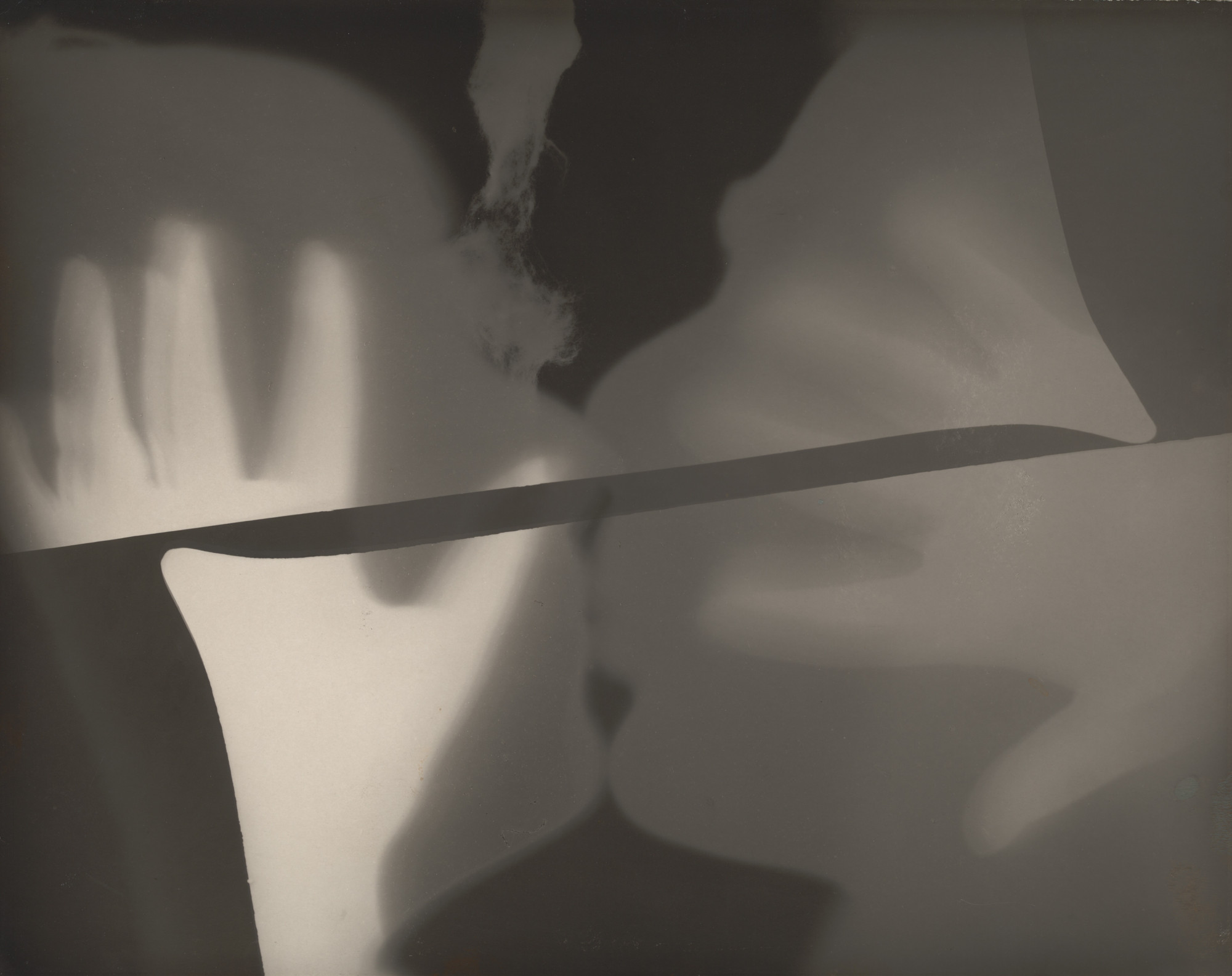
Man ray has made some photos by exposed the paper to a light that hit three times this is called photogram. each time a different set of the objects by acted as a stencil paper of the pair of hands kissing and to darkroom trays. which seem almost to kiss each other which it seem that it looks like to woman kissing but its tow darkrooms trays with the corner kiss each other.

Image result for man ray emmanuel radnitzky

this is the photo of the the tow trays and the hands by looking at the photo to me it dose not seem like to trays. It looks more like two woman kissing but I would not see it like tow trays next to etcher but this is what I see I call it a minds trick in a way.

Le Violon D’lngres violin of ingres

man ray was inspired by jean-Augste-dominique Ingres’s la grande baignesues, ray had asked Kiki de motparnasse to be a model and to wear a turban for this piece. he wanted to transform the female body in to a  musical instrument, by painting sound-holes on her back he wanted to play with the idea of objectification of an animate boy. As well throughout  his career Man Ray was fascinated with juxtaposing an object

Image result for man ray


what i like about this work is that how Ray Man done is that he used is painting and photographer to make a kind of like Photoshop and i like how all his work is black and whit.

Les Larmes glass tears

with this photo its set out to look like a film cover for a movie, this photo has been cropped photograph demonstrates. Man ray was interest in the cinematic narrative if you can see the model’s eyes and mascara are coated lashes are looking upward by invoking the the viewers to wonder where she looking .

Image result for man ray

by looking at this photo you can see the shadow for the noes and the tear drops, by looking at this you can see that the light must be at a 45 degrees. If i have to guess in this photo must be loop lighting.


My opinion on Man Ray’s work

I do like how Man ray work use’s all of his key elements to make his photo stand out and my favorite photo has to be Le Violon D’lngres violin of ingres the things i like about this photo this is that how it been done that he transformed the female body in to a instrument.


Francesca woodman

Screen Shot 2018-10-01 at 14.57.31.png

Francesca woodman was a photography student at Rhode Island School of Design she work with black and white photos and models which were nude and abandon builds. by doing this she could show her emotions though her photography.

in the abandon buildings she would use objects that were in the inside of the building so that she could composition. like in one photo she has a door in the abandon room which is balancing on the wall.

Screen Shot 2018-10-01 at 15.23.34.png

here is the photo of the door that is balancing on the wall to the floor and as you can see she has a model that is under the door. by looking at this she could be saying in this photo she being shy or she hiding  and closing of to people there could be many ways that you portray this images.

Screen Shot 2018-10-01 at 14.59.38.png

in this photo you can see a woman that she is puling up her hair on to the wall this is a interconnect to how she was fleeing about taking here on life when you look at all of these photos that she was taken.

Francesca woodman had a troubling history battling with her depression and heart break at the same time. she never really talked to the people in her class about how she felt but once, to one of her friends she opened up to how she felt about depression the only way she can cope with here depression was taking photos and to show people how she felt inside herself.

What I feel about here work

Like the way how she use the surroundings to make here photos vibrant and the balance to black and white photos, and how she use here wide space for the abandon place to make here photos.

fast shutter speed and the angles/ viewpoints

The fast shutter with a DSLR camera

is a freeze action if you are photographing birds it will be at 1/1000th second or faster. however for general photography of slower moving subjects. you would be able to take a photo at 1/2000th second or 1/100th second or even longer without introducing motion blur.

in this photo it shows you how the effects of the camera of the aperture work so if you wanted to take a photo of a moving object to show its moving put the aperture to f32 by putting it f32 the aperture is exposed to the light will give blue effect. then theirs trying to take a photo by showing a object moving bring the shutter speed down to 1/8 you will get a moving effect.

Related image

as well you can use a fast shutter speed so you can hold the camera and freeze people in motion along making a hand-held image’s of taking a photo of building’s architecture, in the style of Alexander Rodchenko.

Who is Alexander Rodchenko

a good way to lean about whys of how to work a camera is to read up on famous photographers like Alexander Rodchenko.

im going to writ up about him and we all should will a under standing on how to use you camera.

Alexander Rodchnko stared as a artist the art work he did was called composition but the Russian people did not like his work nor understand it. so Alexander went for photographer in hope that the people will under stand his work by the power of photographer. then the people could understand his work it shown people how he could tell people expressions and how he would take photo form a complex angles and form below and above . when you look at is work you can the contrast to light and dark but not just the light and darkens by looking more in to his photos. Hes telling you how he see the world though is eyes just by taken a photo like telling a story form his photos of everyday life.

here are some photos that he has taken

arts-graphics-2008_1183329a

download

Rodtschenko_4_04

What I like about Alexander work

I do like the way how he takes his photos form different angles for the buildings and his above and below he takes.

camera shutter

I’m going to writing to you about the ways of using you camera shutter what seep to keep it in and how to use it effectively.

there are three functions of the camera that you will need to known about one of them is your shutter speed and the two others are aperture and the ISO. shutter speed is a responsible part of the two particular that will changed the brightness of the photo’s you have taken. there are more effects that you can create as well there are dramatic effects, freezing action or the blurring motion with the shutter speed.

The shutter

the camera shutter is located  on the front of the inside of the camera. The shutter will always be closed when you press the button, then the camera shutter will open and it will be fully be exposed to the light coming in to the camera.

The speed of the shutter is the length of time your camera shutter in which it will be exposed to the light on to the camera sensor.  the long you keep the camera shutter open for.

when you are using the the shutter for how long the speed is at you will end up, with a exposing your senor to a significant period of time that will effect of the. Shutter speed is motion blur. which means if you keep the speed long. Then the moving object will be come blurred.

What you need to do is by setting your camera to “Shutter Priority” mode, you choose the shutter speed, and the camera and it will automatically selects the aperture.

By setting the camera to “Manual” mode, you choose both shutter speed and aperture manually.

What is Aperture?

Aperture is a hole within a lens, through which light travels into the camera .As you move between bright and dark environments, the iris in your eyes either expands or shrinks, controlling the size of your pupil. In photography, the “pupil” of your lens is called your aperture. You can shrink or enlarge the size of the aperture to allow more or less light to reach your camera sensor. The image below shows an aperture in a lens.